eSoftSafe PC Cleaner Pro
Install > Run > Scan > Clean Junk



Install
(Click on the download eSoftSafe PC Cleaner Pro)


Run
(Open .exe file and run the software)

Scan (Scan starts automatically on the launch.)

Clean PC (Click on the Clean Now button to remove junk files.)
Every PC has limit to store digital data. With time, the storing capacity gets full and your PC started behaving abnormally, slow in booting, app freezing, hanging and a lot more system issues.
We design eSoftSafe PC Cleaner Pro that helps user to maintain PC helth. It cleans all unwanted junk files like, Cache, Registory errors and in last it finally boost your PC storage and clean RAM.
After Download, Click the
"PCCleanerProSetup.exe" file link below
When Prompted, Click "Yes" on the system dialog window to confirm you want to install eSoftSafe PC Cleaner Pro
eSoftSafe PC Cleaner Pro
Follow the setup instructions to install eSoftSafe PC Cleaner Pro.
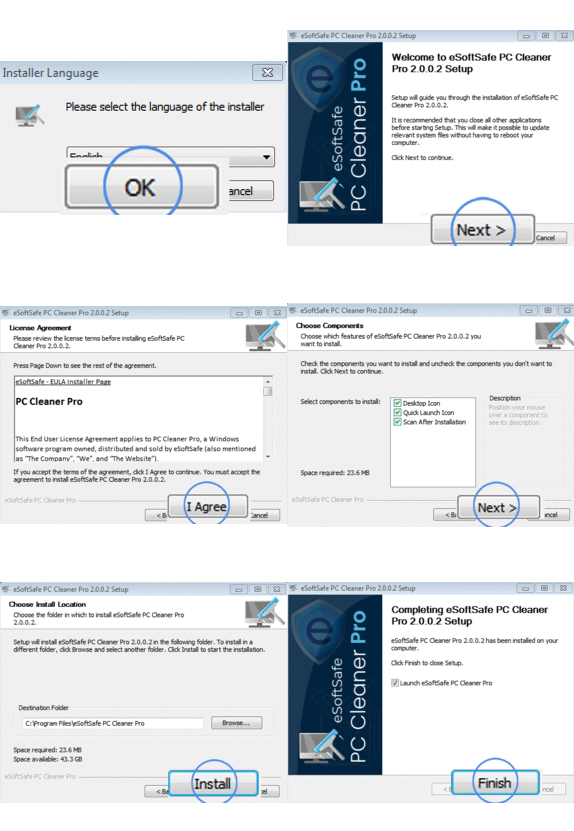
After Download click on the file on the top right, where the green arrow is pointing to and follow instructions.
When Prompted, Click "Yes" on the system dialog window to confirm you want to install eSoftSafe PC Cleaner Pro
eSoftSafe PC Cleaner Pro
Follow the setup instructions to install eSoftSafe PC Cleaner Pro.
After Download, Click the
"Save File"
After Download, access the eSoftSafe PC Cleaner Pro Installer by Clicking in the top right
Follow the setup instructions to install eSoftSafe PC Cleaner Pro.
eSoftSafe PC Cleaner Pro
After Download, Click the
"Save File"
After Download, access the eSoftSafe PC Cleaner Pro Installer by Clicking in the top right
Follow the setup instructions to install eSoftSafe PC Cleaner Pro.
eSoftSafe PC Cleaner Pro